Category Archives: Game Updates

Raven Work in Progress – Dropping

One of the reasons I don’t accept donated code for my addons is that I extensively change the code from release to release.  Version control is difficult enough to control on my own.  When people contribute “fixes” for perceived problems, it adds and element of complexity that I don’t have time to tackle.

Check out this screenshot of the drop script for the Ground Control Station…
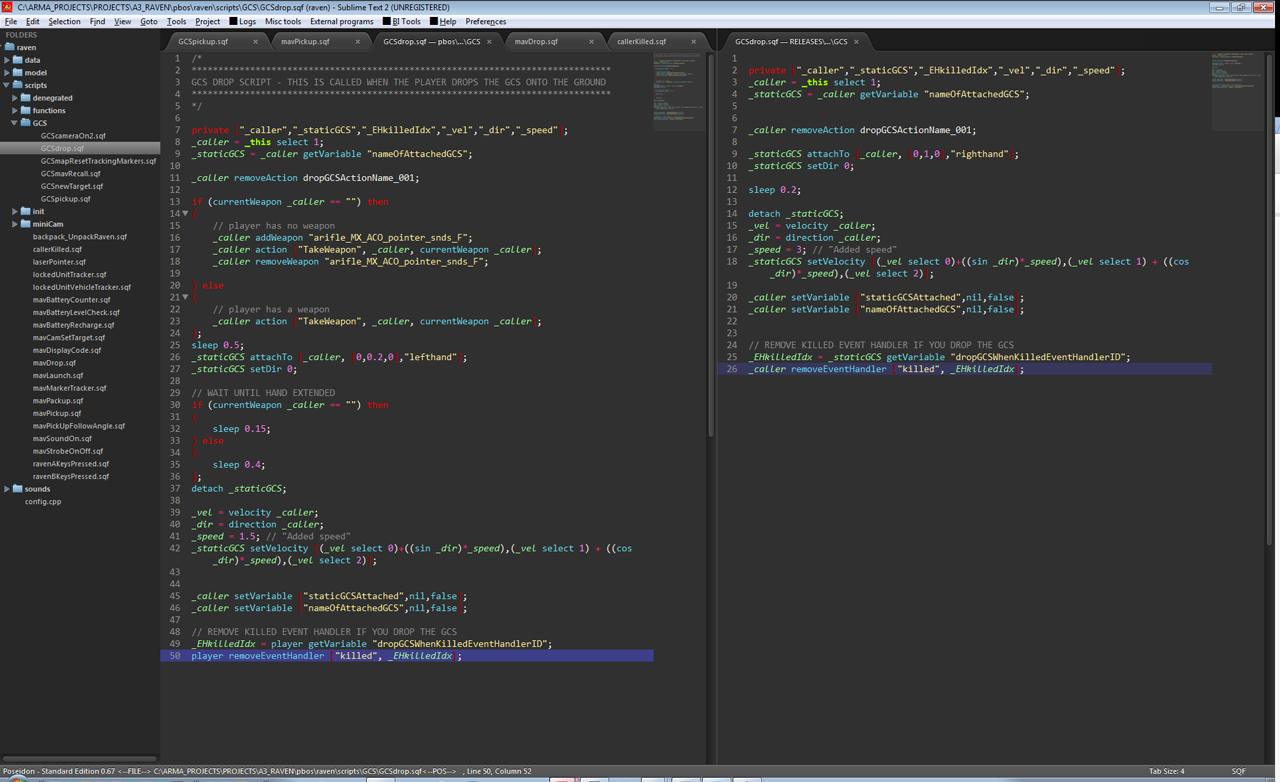
New on the left, old on the right

Even by not looking closely, you can see that I’ve more than doubled the number of things that are going on in this page just to drop an object.  One thing I implemented in the new version was reaching out to pick up and drop things.  If you have a weapon, the code works easily.  But for units that don’t have a weapon, I had to create a workaround (adding a weapon, calling the command to reach for a  weapon (current weapon), then removing it quickly).

Also, if you have a weapon, you reach out at one speed.  If you don’t have a weapon, you reach out much faster.  So I had to create a structure to work around these different situations and it required a lot of testing to figure things out.  The speed at which a unit drops something is not something I expect anyone to notice while playing.  But if I didn’t pay attention to these kinds of details and situations, the unit wouldn’t drop the object fast enough and then the unit would get injured by the object.

Now, if a user of my addon took the old version of this page (the one on the right) and modified it to fit their needs and sent it to me, I wouldn’t know where to start with implementing their changes.

These are just a few more reasons why I have my terms and conditions written the way they are.   Learn what you can from my code, but don’t change it without my permission.

Modifying My Work

Recently a new user in the Arma community took the code from my Raven addon and modified it in order to, in his opinion, “fix” broken things.  The things he “fixed” weren’t broken, they were just personal preferences that he wanted to implement.  He went onto my release thread and tried to get me to use his changes to modify my original files.  When I told him that the modifications he made were a violation of my terms and conditions of use of the addon, he reacted badly and said that he had a right to do anything he wanted.

Unfortunately, I had to get the moderators involved and they shut down the discussion.  But I’d like to post a little more about my own point of view and why I’ve set the terms and conditions as I have.

In the terms and conditions for the Raven, I clearly state that you can do whatever you want to my code and addons and mods if you want to learn from them.  You can feel free to reverse engineer them and I encourage that by putting comments in my code which I think other people can find useful.  

But once you start modifying my code for the purposes of releasing it without my permission, that’s when I have a problem with it. The reason for that is that I’ve had a few people over the years take my hard work and modify it and release it without my permission, oversight or consent. These people get credit for my original work and I get the blame for when it doesn’t work.  People have come to me and said things like, “Hey Feint, I was using your Raven addon in the Altis Life addon and it didn’t work. Can you fix it?” And I respond with, “The Altis Life people never told me they were going to modify my files. So I’m sorry, I don’t know what they changed and I don’t know what is wrong.” It’s just a pain in my ass. It’s happened with several of my addons and graphic mods and having to spend time to answer those emails and PMs, research what’s going on and figure out that the problem has nothing to do with me is just tiresome and unfortunate.

I hope that people will understand that I’ve been a strong contributor to the Arma community for years and that those contributions don’t involve me just giving everything away so people can do whatever they want with it.  The terms and conditions of use should be read and respected so that a community of mutual respect can continue to grow and flourish.

SDV Enhancement

Today I started a new mod for the SDV. I first wanted to figure out a way to add light to the interior. However, there are a few problems with using chemlights (noise, looks OK from exterior, but not great from interior, temporary and has to be regenerated, too bright, light spills all over the model). But luckily I found that there is actually an interior light already built into the SDV by Bohemia Interactive that solves all of these problems. They just set the values really low and you can’t see it in the vanilla SDV. So I decided to play around with the settings and voila! With the doors closed, you can’t see the interior light at all.
mod_SDVMod
I’m also implementing a few other config changes because I don’t like how you can’t control the mast when you’re the driver and I don’t like that you can’t open or close the exterior doors when outside of the SDV.

Planned Features:

  • Interior Light Front and Rear – done
  • Doors can be closed from inside or outside of the SDV – done
  • Periscope Mast can be raised or lowered by the driver – done
  • Periscope starts out stowed, not deployed, when placed on the map – done
  • Gunner PIP scope is zoomed in so it’s more usable – done
  • Adding sound effects for doors and periscope/antenna – WIP
  • 3D Clickable cockpit (maybe – only really works when not moving because of SimX limitations) – WIP
  • Other features T.B.A. – WIP


So far, I can only get the lights to turn on when the headlights are also on. I’d like to hook the interior lights up to only come on with the Collision Lights Action, but so far I’m still trying to figure out if that is even possible.

I’d also like to figure out how to change the feed on the driver and gunner PIP scopes so that I can change from TV to NV to TI and back. I have a few ideas on how to do that, but so far nothing has worked. setPIPEffect doesn’t work alone, so I think I need to set it and then setObjectTexture for the SDV again or something.

Development thread here:
http://forums.bistudio.com/showthread.php?179535-SDV-Mod

Paddle Mod Released!

After a few weeks of development, I’m happy to announce the release of the Paddle Mod, version 1.0.  It was a fun development process.  I learned a few new things about how to rotate objects.  Hint: setDir works OK, but only if the object is on a perfectly horizontal plane.  Otherwise, you are going to have to use setVectorDirandUp to rotate something at an angle.

The release thread is here:
http://forums.bistudio.com/showthread.php?179498-Paddle-Mod-RELEASED!&p=2715988

I’ve added a new set of instruction pages to this site explaining how to install and run it.  If you have any questions or comments, please let me know!